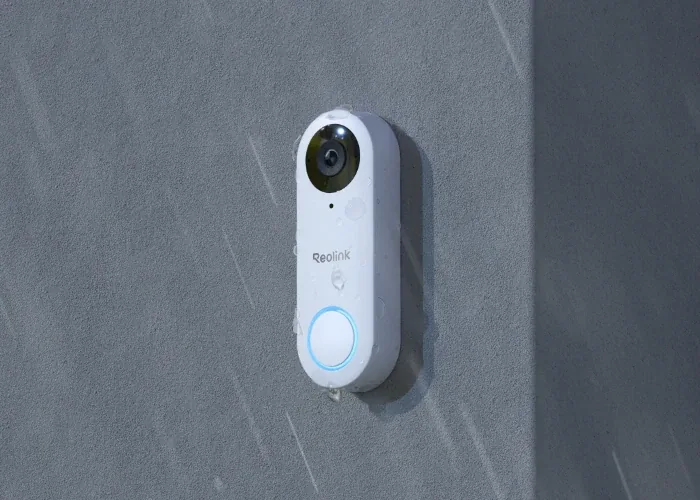
Short Answer: Buy for the Recording Path First
For a new local setup, Reolink Video Doorbell PoE is our starting recommendation because it combines a documented Home Assistant integration with local recording. PoE means one Ethernet cable carries power and data. The powered Wi-Fi model is the alternative when Ethernet is impractical. This is a compatibility recommendation, not a measured winner for image quality or talk delay.
If you already have a UniFi Protect recorder, compare its doorbells before buying a second camera system. If the family wants to answer through Apple Home, compare Aqara G400 Wired and G410, then confirm the separate Home Assistant functions you need. Local means traffic stays on your home network; it does not automatically make remote phone notifications or cloud recording work without internet access.
Researched from manufacturer and Home Assistant documentation, checked September 15, 2026. We have not bench-tested these doorbells or measured their latency, battery life, or image quality. The cover uses Reolink manufacturer imagery, not a Tara installation photograph.
Tara's rule: a doorbell camera is both a camera and a front-door workflow. Pick the product by wiring, recording, privacy, and family app behavior before you chase small spec differences.
Current Shortlist
| Model or family | When to choose it | Documented connection | Check before buying |
|---|---|---|---|
| Reolink Video Doorbell PoE / powered Wi-Fi | A local camera and doorbell-event setup without buying a recorder first. | Official local Reolink integration; local microSD recording or a separate recorder. | Exact black/white model features, Ethernet or power wiring, replacement chime, and the app used for talk. |
| UniFi G4 Doorbell Pro / Pro PoE Kit | A home already using Protect. | Official UniFi Protect integration through the local console. | Console and storage costs. API-key-only mode lacks event entities, the signals used for button-press automations. |
| UniFi G6 Entry / G6 Pro Entry | A newer UniFi option to compare before committing to G4 hardware. | Vendor lists Protect and Access; both use PoE+. Home Assistant integration features still need checking separately. | Correct PoE+ supply, console compatibility, and actual ring-event support on your firmware (device software). Vendor access-control features are not blanket Home Assistant guarantees. |
| Aqara G400 Wired | Apple Home with wired power or PoE, without needing the G410 hub features. | Vendor documents HomeKit Secure Video plus RTSP/ONVIF for Home Assistant. | No existing traditional chime support. Memory card required for its continuous recording and NAS backup; test button events and talk separately from video. |
| Aqara Doorbell Camera Hub G410 | Apple Home plus the bundled hub, or an installation needing battery flexibility. | Vendor documents RTSP and advanced Matter bridging, alongside HomeKit Secure Video. | Wired power is required for RTSP and continuous recording. Bridging accessories over Matter does not establish a Matter video feed. |
| Tapo D130 / D230 | An existing or price-sensitive Tapo setup, after checking the exact device. | Both appear in Home Assistant's TP-Link supported-device list. | D230 being listed does not make it an RTSP camera: Tapo lists it among battery models without general RTSP support. |
| Tapo D225 / D235 / TD25 | A flexible-power model when the documented always-on configuration is suitable. | Vendor RTSP support requires hardwiring, its specified jumper, and always-on mode. | RTSP video is not proof of Home Assistant button-event support. D225 is not on the reviewed official supported-device list. |
| Reolink Doorbell Battery | A home that cannot run power or Ethernet and accepts sleeping-camera limits. | Official Reolink integration through a compatible Home Hub or NVR, not a direct connection. | Budget for that hub. Continuous dashboard viewing consumes battery; validate wake and recording behavior. |
| Existing Ring doorbell | Keeping a device you already own when cloud dependence is acceptable. | Official cloud integration with live view, real-time events, and polled status. | Subscription for the last-recording entity; no two-way audio in the official integration's live view. |
Why Reolink Is the Default Local-First Pick
The official Reolink integration documents local streams, a Visitor signal for button presses, and recording playback for supported storage. Those are separate functions to verify after setup. A working video card alone is not the finished installation.
Black and white are not just colors. Reolink's PoE product page describes the white model's taller 3:4 view and package detection, while the black model has a wider 4:3 view. Choose for your doorstep layout and exact model specifications, not the brand name alone.
Check the old chime before ordering. Reolink's installation guide says the listed PoE/Wi-Fi models do not operate the existing mechanical chime. Reusing its power wires is not the same as keeping that chime working. Budget for a compatible replacement and have an electrician check unsuitable or uncertain wiring.
Battery is a different purchase. Home Assistant documents Reolink Doorbell Battery through a compatible Home Hub or NVR. It is not a direct substitute for the powered model, and a continuously viewed stream keeps it awake. Local integration is possible, but always-on viewing is the wrong expectation.
When UniFi Is Better Than Reolink
UniFi is most compelling when you already own the console and storage. The current Home Assistant integration offers full access using a local user plus API key, or a limited API-key-only mode. The latter provides camera streams and snapshots but not event entities. Choose full access when the documented ring-event workflow is required, and check permissions rather than assuming every connection mode exposes the same features.
The existing G4 Doorbell Pro remains worth comparing with G6 Entry and G6 Pro Entry. Both G6 models require PoE+, a higher-power Ethernet supply, and are listed for Protect and Access. Do not assume an ordinary doorbell transformer powers them, or that all advertised access-control functions are exposed in Home Assistant. Confirm firmware, console compatibility, and the actual entities before the return period ends.
Where Tapo Fits
The TP-Link integration lists D130 and D230, but a supported device does not necessarily provide every camera function. It uses local communication while requiring TP-Link account credentials for authentication on these newer devices; live view also needs the separate camera account where supported.
D230 and D225 are not interchangeable. Tapo's RTSP/ONVIF guidance lists D230 among battery models without general RTSP support. It makes an exception for D225, D235, and TD25 only with the specified hardwiring, jumper, and always-on mode. RTSP is a local video-stream format; ONVIF is a camera compatibility protocol. Neither alone proves that pressing the doorbell creates a usable Home Assistant event.
Follow the exact manufacturer's wiring instructions, not a generic jumper diagram. If you cannot verify both the feed and the button signal for the model and firmware you can actually buy, use another shortlisted option. Do not infer failure solely because a model is absent from a community-tested list either; treat missing evidence as something to check.
Aqara G400 or G410: Choose the Power and App Path
G400 Wired is worth comparing if you want Apple Home plus PoE or suitable low-voltage wiring. Aqara documents RTSP/ONVIF for Home Assistant, microSD-based continuous recording, and NAS backup requiring that card. It does not support an existing traditional chime. Those facts establish a video and recording path, not a promise that every Aqara detection or call function appears in Home Assistant.
G410 adds hub functions and battery flexibility. Its RTSP stream and continuous recording require wired power. The advertised Matter controller, Thread border router, and advanced bridging functions must not be confused with a promise that the doorbell video itself is delivered over Matter.
HomeKit Secure Video is not subscription-free local recording. It stores encrypted clips in iCloud and needs iCloud+ and a supported Apple home hub. Local memory-card recording is a separate choice. See Apple's recording requirements and our guide to HomeKit Secure Video versus Home Assistant before deciding where the family will review clips.
Why Ring Is an Existing-Owner Path
The official Ring integration is useful if you already own a doorbell and accept its cloud connection. It supports live view and real-time events as well as status polling every 60 seconds. That polling interval does not mean every button alert must wait a minute.
The documented limits matter: the last_recording entity requires a Ring subscription, and two-way audio in the integration's live view is not supported. Keep the Ring app for answering visitors. A locally displayed Ring feed or downloaded clip does not turn the camera into a cloud-free device.
Check Four Functions, Not One Compatibility Badge
- See live video. Does the exact model expose a feed to the intended app? A sleeping battery camera and a continuously powered camera can behave differently.
- Receive a button press. Does a real press produce a Home Assistant event or sensor change? Motion detection is not a substitute for a visitor pressing the button.
- Find a recording. Where is it stored, and which app can replay it? A dashboard feed does not make Home Assistant a continuous recorder.
- Talk to the visitor. Does the microphone work in the app your family will actually use? Hearing the camera's audio does not prove your voice is sent back.
A manufacturer specification for two-way audio describes the product, not every third-party integration. If talking inside Home Assistant is non-negotiable, verify your exact camera, firmware, stream bridge, dashboard card, and phone microphone permissions before buying multiple units. A vendor app or Apple Home can be a deliberate choice, not evidence that the Home Assistant talk path works.
A Worked Purchase Plan for One Front Door
Consider a house that can run Ethernet, wants local recording, and does not already own a camera recorder. A sensible starting list is a Reolink PoE doorbell, a compatible PoE switch or injector, the cable run, a suitable memory card, and a compatible chime. Home Assistant receives the visitor signal and can turn on the porch light. Decide separately which app handles two-way talk and remote clip access.
If that house already owns Protect with storage, compare the additional cost of a UniFi doorbell and the correct PoE supply instead of buying a second recorder. If Ethernet is impossible, compare powered Wi-Fi with the cost and maintenance of a battery model plus its required hub. These are decision examples, not price quotes or tested installations.
- Up-front costs: doorbell, power supply, wiring work, chime, storage, any required hub or console, and weather-appropriate mounting.
- Continuing costs: cloud recording if chosen, remote-access service if chosen, storage replacement, and battery maintenance where applicable.
- Fit checks: doorway viewing angle, package visibility, wall dimensions, local temperature limits, and Wi-Fi signal at the actual mounting point.
The Setup Order That Usually Works
- Decide the power path first. PoE, one cable for power and network, is best when you can run Ethernet. Powered Wi-Fi is second. Battery-only is last for Home Assistant dashboards, local streams, and 24/7 recording.
- Decide where recordings live. Use microSD, NVR/Home Hub, NAS, Frigate, UniFi Protect, or HomeKit Secure Video. Do not assume Home Assistant itself is your long-term NVR.
- Use the documented integration for that model. Reolink, UniFi Protect, TP-Link and Ring have different prerequisites. RTSP/ONVIF video is a different path; HomeKit Bridge exports Home Assistant devices to Apple Home rather than discovering an arbitrary doorbell.
- Test the real doorbell press. A live camera feed is not enough. Confirm Home Assistant gets a visitor, ring, event, or sensor state you can use in automations.
- Build conservative automations. Send a snapshot, announce at home, turn on porch lights, and show a dashboard view. Avoid using camera AI alone to unlock doors or disarm security.
Before the Return Period Ends
- Have someone press the button while you watch the actual Home Assistant entity. Test a second press and check for missed or duplicate notifications.
- Record a short clip using the chosen storage, then locate and replay it from the app you plan to use.
- Test a conversation in that app with the phone locked first, and again while away from home. Do not call the setup finished based only on a desktop live feed.
- For a local-only requirement, test the camera's internet restriction while keeping its LAN connection and necessary local services intact. Check the local feed, press event, and recording separately. Remote phone push may still depend on internet services.
- For a battery model, check that it returns to sleep when you close the feed. Do not leave it streaming on a wall tablet during the test.
Privacy and Safety Boundaries
Doorbell cameras face public space, neighbors, delivery people, guests, and family routines. Use privacy masks where the product supports them. Keep RTSP and ONVIF local camera paths on trusted local networks, as Tapo's own RTSP/ONVIF FAQ warns. Do not expose raw camera ports to the internet. Use Home Assistant Cloud, Tailscale, WireGuard, or another secure remote path if your phone needs rich notifications outside the house.
Do not connect a low-voltage doorbell directly to mains power. Follow the exact model's electrical instructions and use a qualified electrician for uncertain wiring or transformer work. Do not test camera integration by unlocking doors or disarming alarms; keep those actions deliberate and separate from camera detections.
Tara Recommendation
Start with Reolink PoE for a new local Home Assistant setup; choose its powered Wi-Fi counterpart when that better fits the wiring. Compare UniFi when Protect is already part of the home, and Aqara G400 or G410 when Apple Home is the intended answering app. Keep an existing Ring if its cloud tradeoff is acceptable instead of replacing working equipment just for a brand preference.
Plan the doorbell kit around the actual press, light, recording, notification, and talk workflow. Do not promise one-app operation until each required function has been verified.
FAQ
What is the best Home Assistant doorbell camera in 2026?
Start with Reolink Video Doorbell PoE when Ethernet is practical, or its powered Wi-Fi counterpart when it is not. Existing UniFi Protect households should compare G4 Doorbell Pro with G6 Entry models. Apple-first households should compare Aqara G400 Wired and G410. Confirm the exact model's chime, recording, button-event and talk paths before buying. These are documentation-based picks, not a hands-on ranking.
Is Ring worth buying for Home Assistant?
Not for a cloud-free installation. Existing Ring owners can use the official integration for live view and real-time events as well as polled status updates. It remains cloud-dependent, the last-recording entity needs a Ring subscription, and the integration does not currently support two-way audio in live view.
Is a Matter logo enough for a Home Assistant doorbell camera?
A Matter logo alone is not enough. Verify the exact product and firmware, the Home Assistant integration, and support for video, button presses, recordings and two-way talk separately. A Matter controller or bridge built into a doorbell does not establish that its camera is exposed over Matter.
Can Home Assistant do two-way talk through a doorbell?
It depends on the complete model, integration and dashboard path. The official Ring integration explicitly excludes two-way audio in live view. For the other options, a vendor's microphone-and-speaker specification is not proof that talk works through your chosen Home Assistant card. Verify it on the actual phone or tablet, or choose the vendor app or Apple Home for answering.
Should I avoid battery doorbells?
Not automatically. Reolink Doorbell Battery can integrate through a compatible Home Hub or NVR. But a sleeping battery camera is a poor fit for a permanently open dashboard, and Tapo D230 does not gain general RTSP support merely because it appears in Home Assistant's device list. Match the exact model to the recording and viewing pattern.
Should a Home Assistant doorbell camera be PoE, wired Wi-Fi, or battery?
Choose PoE for a wired network and power connection, or powered Wi-Fi when only suitable power wiring is available. Battery models can support local integration, such as Reolink Doorbell Battery through a compatible Home Hub or NVR, but are a poor fit for an always-open camera dashboard. Check the exact model's recording and streaming limits.