Yes—tado X Works With Home Assistant Through Matter
The official answer is unusually clear. Home Assistant calls each built-in connection to a device or service an integration. Its Tado documentation says new tado X devices are not supported by the older Tado integration and must use Matter instead. The older connection checks tado's online service; normal Matter commands stay inside the home.
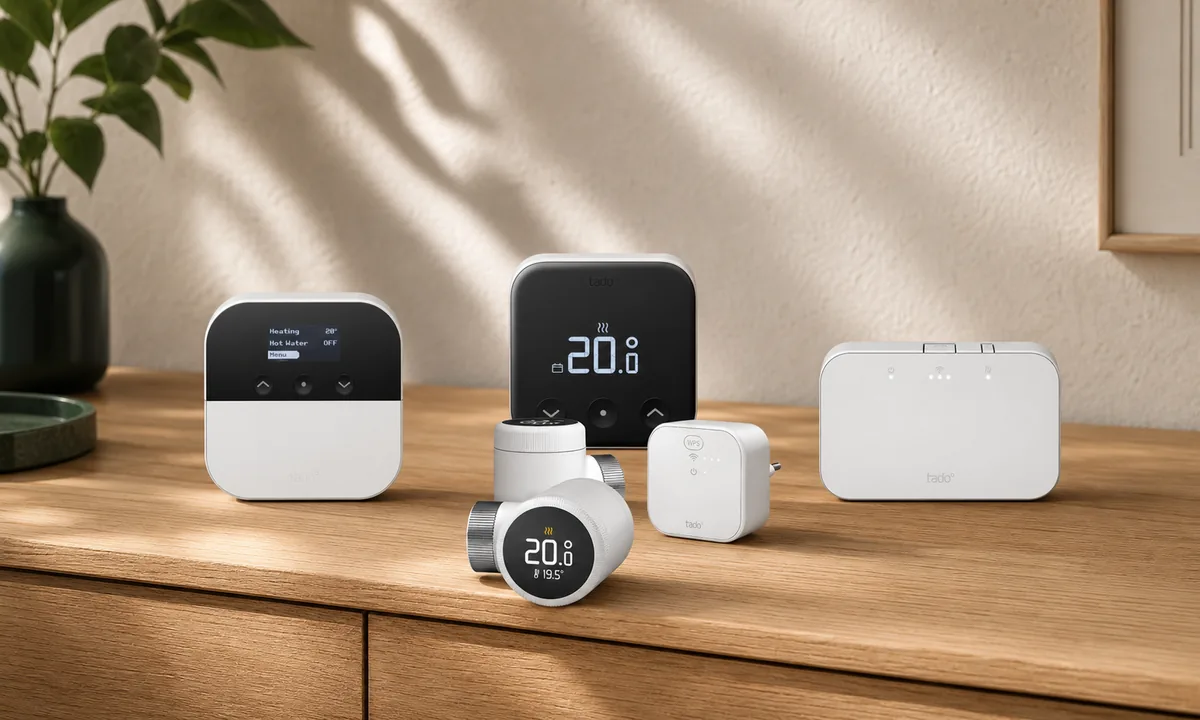
This applies to the current Smart Thermostat X, Smart Radiator Thermostat X, and Wireless Temperature Sensor X. Owner reports commonly show room temperature and humidity, a target-temperature control, and basic thermostat control. Owners using recent Smart Radiator Thermostat X device software, called firmware, also report a simple “needs battery replacement” warning. Exact controls vary by model and software version. They are enough for a local dashboard and an automation—an automatic rule—such as lowering the target when a separate window sensor stays open.
Use this order: finish the boiler, rooms, schedules, and updates in the tado app, then share each thermostat or room sensor to Home Assistant. Do not try to add Bridge X, Wireless Receiver X, or Heat Pump Optimizer X as Matter devices; those products have no Matter setup code.
It is not the whole tado experience. Home Assistant does not receive tado's room schedules, Auto or Away behavior, detailed heating activity, installer settings, or every receiver function through Matter. Current owner reports still describe domestic hot-water control as missing. Think of Matter as the dependable local control layer, not a copy of the tado app.
| Connection path | Official support for tado X | Local or cloud | What it is for |
|---|---|---|---|
| Home Assistant Matter | Yes. This is Home Assistant's official route for X. | Local control over your home network and Thread. | Current reports commonly show temperature, humidity, a target temperature, and basic climate control; exact controls vary by model and software version. |
| Home Assistant Tado integration | No for X. It is for earlier tado product lines. | Checks tado's online service on a schedule. | Do not choose it to add tado X. |
| tado app | Yes. It is tado's supported setup and management path. | Schedules are stored locally after setup; remote access and richer services use tado's cloud. | Heating-system installation, rooms, zone controllers, schedules, app features, support, and the safest device-update path. |
| Community integrations | Unofficial. Support can change. | An online data connection, not local control. | Extra data for advanced users, with online request limits and more maintenance. Matter should remain the basic control path. |
Do You Need Bridge X?
You need a Thread border router: a small hub that connects tado X's low-power Thread network to your normal home network. You do not always need a separate Bridge X.
tado's current Bridge X guidance says a Wireless Receiver X or Heat Pump Optimizer X can provide that function. Its third-party examples include Google Nest Wifi Pro, Apple HomePod mini and selected Apple TV 4K models, Home Assistant Connect ZBT-1, Home Assistant Yellow, SmartThings, eero, and IKEA Dirigera. It does not yet name the newer Home Assistant Connect ZBT-2. Bridge X remains the least confusing choice when you want the full tado app and tado support path.
Home Assistant can provide this hub function when a compatible Thread radio is running the OpenThread Border Router app. For devices to remain online in the tado app, tado says a third-party border router must support NAT64—a network translation service that lets a Thread device reach internet services. Without NAT64, the devices may appear only in the third-party platform. Verify tado app visibility and the device-update path before removing a working tado border router.
Simple recommendation: Keep Bridge X, Wireless Receiver X, or Heat Pump Optimizer X in a new tado heating system unless you are comfortable maintaining Home Assistant's Thread network. tado lists Connect ZBT-1 and Home Assistant Yellow as compatible hubs, but says it can support devices only when they remain available in the tado app. Removing a working bridge rarely improves local Home Assistant control.
What Each tado X Model Does in Home Assistant
tado separates its room controls from the equipment that connects to the boiler or internet. That is why you add the thermostat and sensors to Matter, not every box in the starter kit.
| Current model | Official role | Matter code? | Home Assistant and cloud caveat |
|---|---|---|---|
| Smart Thermostat X | Wired room thermostat for a boiler, zone, or underfloor heating. | Yes. Add each one to Home Assistant. | Basic local climate control through Matter; wiring, boiler configuration, schedules, and advanced behavior stay in the tado setup. |
| Smart Radiator Thermostat X | Rechargeable smart valve head for a compatible radiator valve. | Yes. Add each valve separately. | Local target and room data through Matter. The tado app remains useful for rooms, schedules, firmware, and valve setup. |
| Wireless Temperature Sensor X | Room temperature sensor and setpoint control placed away from the radiator. | Yes. Add each sensor separately. | Basic room data and target control. It relies on the tado system's zone setup to operate the correct boiler or valve. |
| Bridge X | tado Thread border router and internet path. | No. | Do not search for it as a Home Assistant Matter device. It supports the tado network and app. |
| Wireless Receiver X | Boiler and, on suitable versions, hot-water controller; also a Thread border router. | No. | Not directly added through Matter. Current Matter reports do not show its full hot-water and installer controls in Home Assistant. |
| Heat Pump Optimizer X | Connects supported heat pumps and can provide the Thread border-router role. | No. | Its detailed heat-pump features are managed through tado, not exposed as a general Home Assistant Matter device. |
How to Add tado X to Home Assistant
- Check heating compatibility before opening the box. Use tado's product finder for the exact boiler, wiring method, radiator valve, or heat pump. tado X does not mix with V3+ or earlier tado products on the same account.
- Complete the tado app setup first. Add the bridge or receiver, install each room device, assign rooms and zone controllers, and confirm that every room heats the correct zone. Leave the devices connected to tado's servers long enough for automatic updates, then check their firmware versions in the tado app. Create any tado schedule you want to keep.
- Prepare Home Assistant. Update Home Assistant and the Companion app. Under Settings > Devices & services, confirm that Matter is installed. Open the Thread integration, choose Configure, and check that the intended Thread network appears. Keep the phone on the normal home Wi-Fi—not guest Wi-Fi.
- Create a new code in the tado app. Open Settings > Rooms and Devices > Matter device linking, select one Smart Thermostat X, Smart Radiator Thermostat X, or Wireless Temperature Sensor X, and generate its linking code.
- Add a device that is already in use. In the Home Assistant Companion app, open Settings > Matter, choose Add device, and select Yes, it's already in use. Follow the prompts and enter the fresh code from tado.
- Repeat for every room control. Each thermostat, radiator valve, and wireless sensor must be shared separately. Do not try to pair Bridge X, Wireless Receiver X, or Heat Pump Optimizer X as Matter devices.
- Test one safe change. Adjust a target temperature by a small amount in Home Assistant, verify the expected room and heating zone respond, then restore the normal target. Name the device and its controls clearly before building automations.
After a tado X device has joined its first Matter system, the printed QR code is not the normal way to add a second controller. Generate a fresh code from the tado app. tado notes that joining more Matter systems can slightly reduce battery life, so share only with the platforms the household actually uses.
Apple Home and other platforms: tado X joins Apple Home through Matter, not through a separate HomeKit-only connection. To share a room device with Apple Home, Google Home, Alexa, or SmartThings after the tado setup, generate a fresh linking code for that device and add it in the other platform. Keep each daily schedule in one app so two platforms do not send competing commands.
Heating safety: A radiator valve head may be a reasonable do-it-yourself replacement when tado confirms the valve is compatible. A wired thermostat, Wireless Receiver X, zone valve, boiler, or heat pump can involve mains electricity, control wiring, and frost-protection settings. Follow the model-specific instructions and use a qualified heating installer or electrician when the circuit or terminals are not already known. Home Assistant should never be the only frost or over-temperature protection.
What Still Works Locally, and What Needs tado
- Local in Home Assistant: Matter readings, target-temperature changes, basic climate control, dashboards, and automations run on the home network when Home Assistant, Thread, and the heating devices are powered.
- Local in the tado devices: tado says a room schedule that has already been saved to an X device continues if the internet connection is lost. Manual control on the thermostat or valve also remains important.
- tado app and online service: Remote access, room and zone management, activity reports, support diagnostics, and tado's richer features use its app and online service. tado documents AI Assist as a paid subscription; basic Matter control and a saved Smart Schedule do not require it.
- Firmware: tado says X firmware is downloaded and installed automatically from its servers, so the devices need a working tado-supported internet or NAT64 path. Home Assistant supports Matter updates in principle, but that does not guarantee delivery of tado firmware. Do not assume the Home Assistant connection replaces the vendor update path.
- Community cloud add-ons: Unofficial integrations may expose more data, but they use tado's cloud API—its online data interface. tado currently limits third-party API access to 100 requests per day, rising to 20,000 for Auto-Assist and AI Assist subscribers, so these add-ons are not a substitute for local Matter control.
To test the local path, disconnect the home's outside internet connection while leaving the router, Home Assistant, Thread border router, and tado system powered. Change one room target from the local Home Assistant dashboard and confirm a saved tado schedule still runs. Reconnect the internet after the test. Do not switch off the router or bridge, because that tests a power failure rather than a cloud outage.
The Important Matter Limits
As of July 2026, Home Assistant owners consistently describe the tado X Matter view as basic. Current reports commonly show temperature, humidity, a target temperature, and climate control. Owners with recent Smart Radiator Thermostat X firmware also report a simple yes-or-no “needs battery replacement” control. The exact controls and readings shown in Home Assistant vary by model, device-software version, and Matter Server version.
Do not expect tado Smart Schedules, Auto/Away status, Boost, heating-activity charts, room and zone-controller configuration, installer menus, detailed battery percentage, or every device diagnostic to appear. The Wireless Receiver X is particularly important: community reports through June 2026 still say domestic hot-water control is not available through the Matter connection.
If one of those features is essential, keep it in the tado app and put each automation in one place. For example, let tado own the room schedule and let Home Assistant lower targets when the house is in vacation mode. Do not create the same morning and away schedule in both systems; competing controllers make heating behavior harder to understand.
Fix the Common Pairing and Control Problems
There Is No Matter Code on Bridge X or the Receiver
That is expected. tado only provides Matter codes for its room-control devices. Add each Smart Thermostat X, Smart Radiator Thermostat X, and Wireless Temperature Sensor X. The bridge, receiver, and heat-pump controller stay behind the scenes.
The Printed Code or Old Linking Code Fails
Open the device in the tado app and generate a fresh linking code. Then choose Home Assistant's path for a device that is already in use. Reusing the box QR as though the device were new, or choosing the new-device flow for a device already joined to tado, is the common wrong turn.
Matter Device Linking Is Greyed Out
tado recommends waiting 15 to 20 minutes after setup, keeping the phone on the same Wi-Fi, moving Bridge X closer if Thread coverage is weak, and restarting the phone and router before considering a reset. Update the tado app and phone first. A factory reset erases a working heating setup, so use it only after the official checks and when you have time to rebuild every room and zone.
Home Assistant Hangs While Adding the Device
Check that Home Assistant's Matter page opens without an error, the phone is on the normal home Wi-Fi, and the Thread border router is online. Guest Wi-Fi or network isolation—a router setting that prevents devices from talking to each other—can block pairing even when the code is correct. If you deliberately use separate networks, called VLANs, follow TaraHome's Matter network-connectivity checklist before resetting the thermostat.
The Home Assistant Control Appears, but the Correct Room Does Not Heat
Verify the room and Zone Controller in the tado app. Home Assistant is changing the room target; tado's configured receiver, thermostat, radiator valves, and boiler relationship decides how heat is delivered. Do not move receiver wires or change installer settings merely because a Matter control appears.
Heating Works, but Hot Water Is Missing
This is a current feature limit, not a reason to add tado X through the older Tado integration. Keep hot-water schedules and manual override in the tado app or Wireless Receiver X unless tado and Home Assistant later document Matter support for your exact receiver and firmware.
Check These Things Before Buying tado X
- Product generation: X cannot share a tado home with V3+, V3, or earlier devices, and the older Internet Bridge does not work with X.
- Boiler or valve compatibility: Use tado's current product finder for the exact model. tado says X broadly supports relay and OpenTherm, two common boiler-control methods, but its compatibility with brand-specific modulating controls is narrower than the earlier line.
- Thread coverage: Decide whether Bridge X, Wireless Receiver X, Heat Pump Optimizer X, or an officially listed alternative such as Google Nest Wifi Pro, HomePod mini, Home Assistant Connect ZBT-1, or Home Assistant Yellow will cover every floor and radiator location.
- Required features: Buy it for local temperatures, targets, and basic Home Assistant automations. Do not buy on the assumption that hot water, tado schedules, installer controls, detailed battery data, or every app feature will appear in Home Assistant.
- One automation owner: Decide whether tado or Home Assistant runs the daily schedule, away behavior, and window response. A clear split is more reliable than duplicated rules.
- Manual fallback: Confirm the household can still change a thermostat, valve, or receiver and that the heating system keeps its built-in frost and safety controls if Home Assistant is unavailable.
The Practical Setup to Choose
For most homeowners, use tado's supported hardware path for the heating system and Home Assistant Matter for local visibility and automations. Install and update the X system in the tado app, keep Bridge X or the Thread-router function already built into the receiver or heat-pump controller, and share each room-control device to Home Assistant.
That arrangement avoids the cloud-polling Tado integration for daily control without pretending the vendor app is unnecessary. Home Assistant owns the local rules you care about; tado owns heating-system configuration, saved room schedules, firmware, and any feature Matter does not expose. If you want a Home Assistant-only Thread network, treat it as an advanced path and verify tado app access, firmware, and recovery before removing anything.
FAQ
Does tado X Work With Home Assistant?
Yes. Use Home Assistant's official Matter integration. It provides local basic climate control and room readings, but it does not reproduce every tado feature.
Should I Use the Tado Integration or Matter?
Use Matter for tado X. Home Assistant's Tado integration is a cloud-polling integration for earlier tado generations and explicitly excludes X.
Do I Need Bridge X?
You need a Thread border router, but not always a separate Bridge X. Wireless Receiver X, Heat Pump Optimizer X, or a compatible third-party border router can provide Thread. Bridge X is still the simplest vendor-supported choice for the full tado app and support path.
Which tado X Devices Do I Add?
Add every Smart Thermostat X, Smart Radiator Thermostat X, and Wireless Temperature Sensor X separately. Bridge X, Wireless Receiver X, and Heat Pump Optimizer X have no Matter setup code.
Will Heating Work Without the Internet?
Basic Home Assistant Matter control stays local when Home Assistant, the home network, Thread router, and tado devices are running. A schedule already saved to a tado X room device also continues locally. Remote app access and cloud features need the internet.
Can Home Assistant Control tado X Hot Water?
Do not count on it. Current community reports still describe hot-water control and other advanced receiver functions as missing through Matter. Use the tado app or receiver controls for functions Home Assistant does not expose.